WhatsApp is an Instant Messenger client that allows us to communicate by text and voice with any of the contacts of our agenda, however, is also possible to contact other people, although we do not have them on the agenda, simply by temporarily saving the number so that they appear to us in the contacts list.
This can pose a risk to privacy since, not having our platform well configured, it is possible that any person can contact with us (and, for example, try to deceive us), see our State sentence and see our profile picture. We can also protect the privacy of our contacts facing so we can choose whether we want that they can view the time of the last connection and if we read messages or not.
How to configure our privacy on WhatsApp
To set up our privacy in WhatsApp, the first thing we have to do is open our Instant Messenger client and access the settings of this menu. Here we will see the same options. Click on “Account” to access account-specific options.
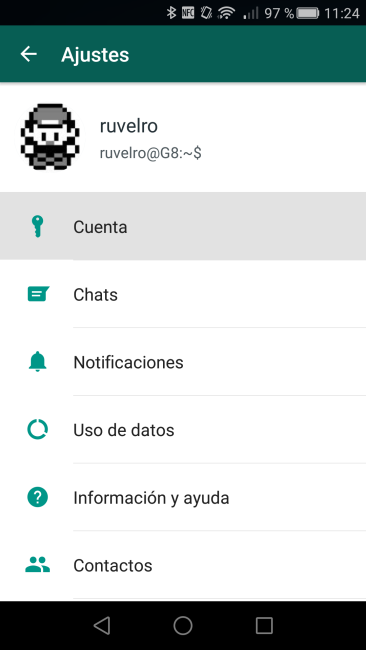
Then we will see 4 new options. Of these, which we are interested in is the first, so-called “Privacy”.

Click on it and we will see a new screen with the different privacy options offered by WhatsApp:

Below, we explain each one of them:
Concerning personal information:
- Last time: From here you can configure the people we want to see our last connection time: all, only our contacts or none.
- Profile picture: You can configure who can view our profile picture: all, only our contacts or none.
- State: You can configure who can view our phrase of State: all, only our contacts or none.

Concerning Messaging:
- Blocked: Here you can see all users we have blocked or add new users to the list. Blocked users, as well as not to see the previous data (time, photo and State) nor can send us messages or let us voice calls.
- Read receipts: Finally, one of the most critical options reviewed, this option allows us to configure if we want our contacts “blue tick” receive them when we read messages that you send to us or not. To prevent abuse, we must bear in mind that users who desmarquen this option will also see if recipients read the messages sent. It is an all or nothing.

Thus, in just one minute will be able to protect our privacy against all our other contacts, something very important, especially if we use phrases or personal photographs to identify us in the Messenger client.
The article how to properly configure your privacy on WhatsApp was published in MovilZona.