Update Windows 10 anniversary has provided to the users of the platform succulent new features, including the ability to activate a dark mode (as opposed to the usual white) that appears in numerous menu system. There are various mods to extend the aesthetics to other sections that do not change by default. With a simple download or adjustment we have to almost the entire interface in harmony.
First step: active the way dark in the app’s settings
It is the simplest step. Go to home > settings > personalization > colors. We scroll to the bottom of the screen and choose the application, we activate the dark option. He Fund of the app configuration is again black, as well as the greater part of them others applications of the platform Universal of Windows.

However, them changes not affect almost any service of desktop, as for example the Explorer’s folders, that will continue to showing is white.
Theme dark also in Microsoft Edge
The Microsoft browser, released with Windows 10, also has a dark theme, although strangely this option is separated completely from the process that I have told earlier and works independently.

To set theme black edge should open the browser, click on the three dots in the upper-right horizontal > configuration > choose a theme > dark.
Install in Chrome, Firefox dark themes and other alternatives
These Web support different themes designed, in many cases, by developers independent, since does already enough years. We only visit the spaces of Firefox or Chrome extensions download and choose dark one that you like.
10 Windows anniversary: why does not update my tablet (or PC) and how can I force it
Set to the dark mode in other desktop applications
He problem fundamental with regard to the mode dark is that not affects to the absolute majority of the applications of desktop of Windows 10. Again, the system offers a native way of activating a black background which generate a high contrast, however, to be honest, the icons and the font of the oldest part of the Microsoft OS (becoming lack a renovation also there) does not look too good with such an appearance. On the contrary, far from good aesthetics get in Modern UIsettings.
If want to do the test, id to the Panel of control > appearance and personalization > change the theme again down the part bottom of the menu can select black in high contrast.
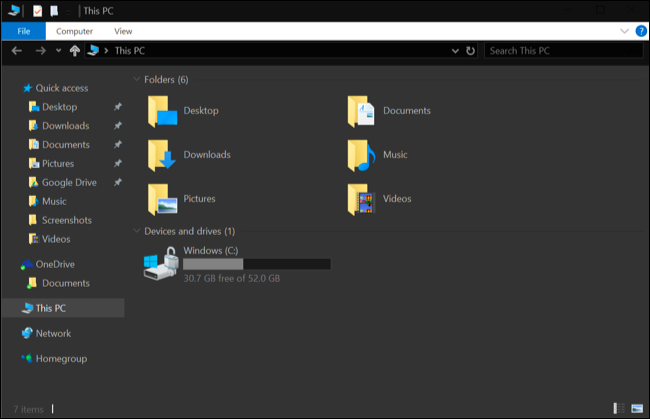
If, by the contrary, aspire to something that look much better, should enter the the world of them themes designed by third, for which is can use tools of the type UxStyle or this another of Debian Art.
Source: howtogeek.com
The article how dark mode on your tablet with Windows 10 anniversary was published in TabletZona.